


Elke workflow heeft een ritme. Een vergadering eindigt, en je grijpt naar dezelfde prompts: stel de opvolgmail op, haal de actiepunten eruit en genereer een gestructureerd rapport. Je weet wat je nodig hebt. Je hebt het al eens getypt. Je zult het opnieuw typen.
De echte kosten zitten niet in het typen – het is de frictie. Elke keer dat je een prompt herschrijft, verlies je tijd, consistentie en momentum.
Vandaag introduceren we Skills – een nieuwe manier om je meest waardevolle AI-prompts om te zetten in directe, herbruikbare acties die je met één tik kunt uitvoeren op elke notitie.
Wat maakt Skills anders
Voer AI-workflows direct uit
Voer vooraf gedefinieerde AI-acties rechtstreeks uit binnen Ask Plaud-gesprekken. Nooit meer vanaf nul beginnen – tik gewoon op een skill en krijg binnen enkele seconden resultaten.
Standaardiseer herhaalde workflows
Gebruik ingebouwde skills of maak aangepaste skills om elke keer consistente resultaten te genereren. Of het nu gaat om een gestructureerde debriefing, een klantgerichte samenvatting of een beslissingslogboek, het formaat blijft hetzelfde – zodat jij je kunt concentreren op wat belangrijk is.
Elimineer het herschrijven van prompts
Sla veelgebruikte prompts op als herbruikbare skills en voer ze uit met één tik. Je meest waardevolle prompts worden permanente hulpmiddelen, geen tijdelijke notities die je moet onthouden en opnieuw moet typen.
Genereer uitvoer uit notitiecontext
Skills putten direct uit het transcript en de notities van je notitie – geen kopiëren, geen plakken. Elke uitvoer is gebaseerd op wat er daadwerkelijk is gebeurd, waardoor je resultaten nauwkeurig en relevant blijven.
Hoe te beginnen

- Open een notitie in de Plaud App of Plaud Web.
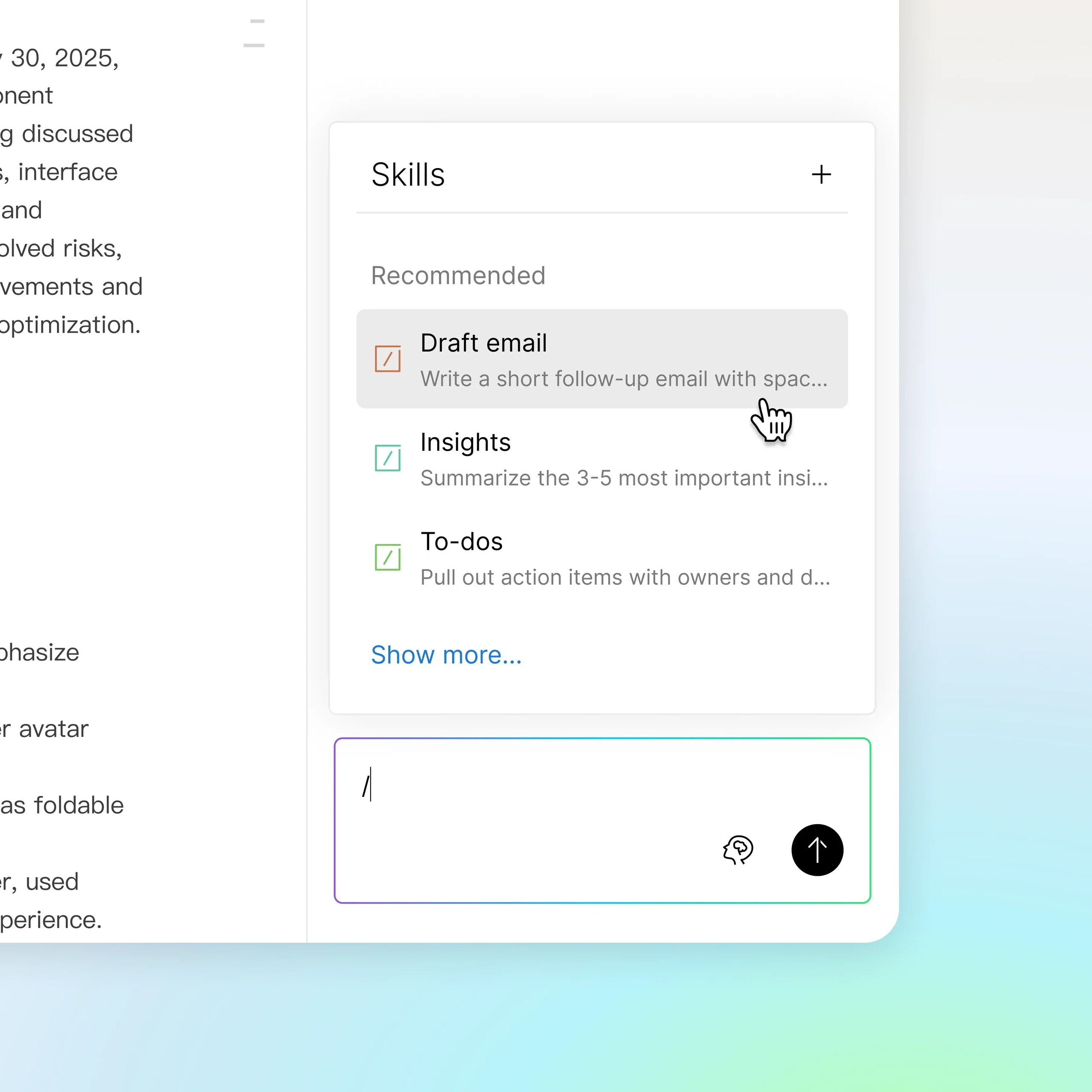
- Navigeer naar Ask Plaud en tik op "/" om het skillmenu te openen.
- Selecteer een skill uit je bibliotheek of maak een aangepaste skill, en je uitvoer is binnen enkele seconden klaar.
Probeer Skills vandaag nog
Skills is nu beschikbaar in de Plaud App en Plaud Web. Open een notitie, tik op "/" en zie wat je prompts kunnen worden.